
Run a tax-saving scenario
Try a what-if, see how it changes your tax, then save it as your plan or discard it.
A scenario shows how your goals and tax-saving options could change your tax for the tax year. Nothing changes in your saved plan until you choose to save it.
Run a scenario
- On Home, tap the Scenarios tab.
- Under Select Scenario, choose the one you want.
- Fill in the details it asks for. These differ by scenario, for example a Budget (£), a target tax band, a target rate or a target income.
- Tap Run Scenario.
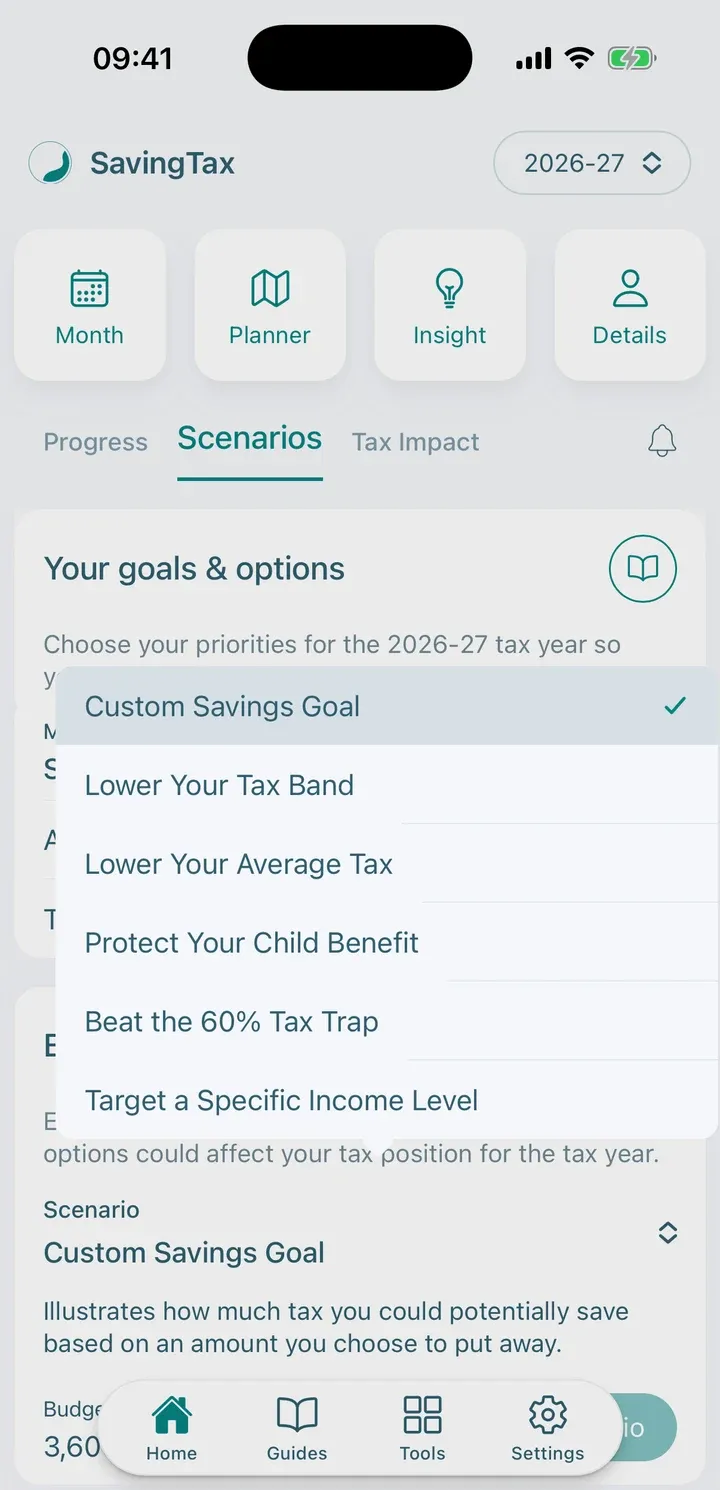
The scenarios
Free
- Custom Savings Goal: how much tax you could save from an amount you choose to put away.
Premium
- Lower Your Tax Band: contribution levels that might move your income into a lower tax band.
- Lower Your Average Tax: how much you may need to contribute to reach a lower effective tax rate.
- Protect Your Child Benefit: how reducing your adjusted net income could reduce or avoid the High Income Child Benefit Charge.
- Beat the 60% Tax Trap: how much you may need to contribute to bring your net income below the £100,000 personal allowance cliff-edge.
- Target a Specific Income Level: the contributions that could take your adjusted net income under a level you choose.
Save or discard
When the results appear, you have two choices:
- Save plan makes it your tax-saving plan for the tax year. The app asks you to confirm.
- Discard what-if throws the scenario away and keeps your current plan.
If you have an unsaved scenario, you need to save or discard it before you can carry on.
Tip: After you change your income or goals, an old scenario shows Out of date. Run it again.
Next: Read your results.